PhoneFast-EN
Have you ever encountered these issues?
- adb keeps failing to select the right element or selects the wrong one, causing Vibe Coding to burn through tokens🔥🔥🔥🔥🔥.
- adb dump xml fails, forcing you to rely solely on screenshots for verification — but the model is single-modal😖😖😖😖
phonefast: Precisely cracks the four deadly pain points of Harness Coding in mobile verification — Slow, Inaccurate, Token-burning🔥, Unstable — broken one by one.
| Pain Point | Solution | Effect |
|---|---|---|
| 🐢 Slow | Daemon resident process + Unix Socket JSON‑RPC | <10ms touch latency, 100x faster than ADB shell |
| 🎯 Inaccurate | Atomic observe, screenshot + UI tree returned in one call | Completely eliminates the race window of “UI changed after screenshot” |
| 🔥 Token burning | MCP native ImageContent, multimodal direct output | No more stuffing dozens of KB of base64 into JSON, tokens halved |
| 🛡️ Unstable | Three-level keepalive + auto-reconnect + panic self-heal | 12-hour stress test, 140k+ operations, 99.99% success rate |
📺 Video Comparison
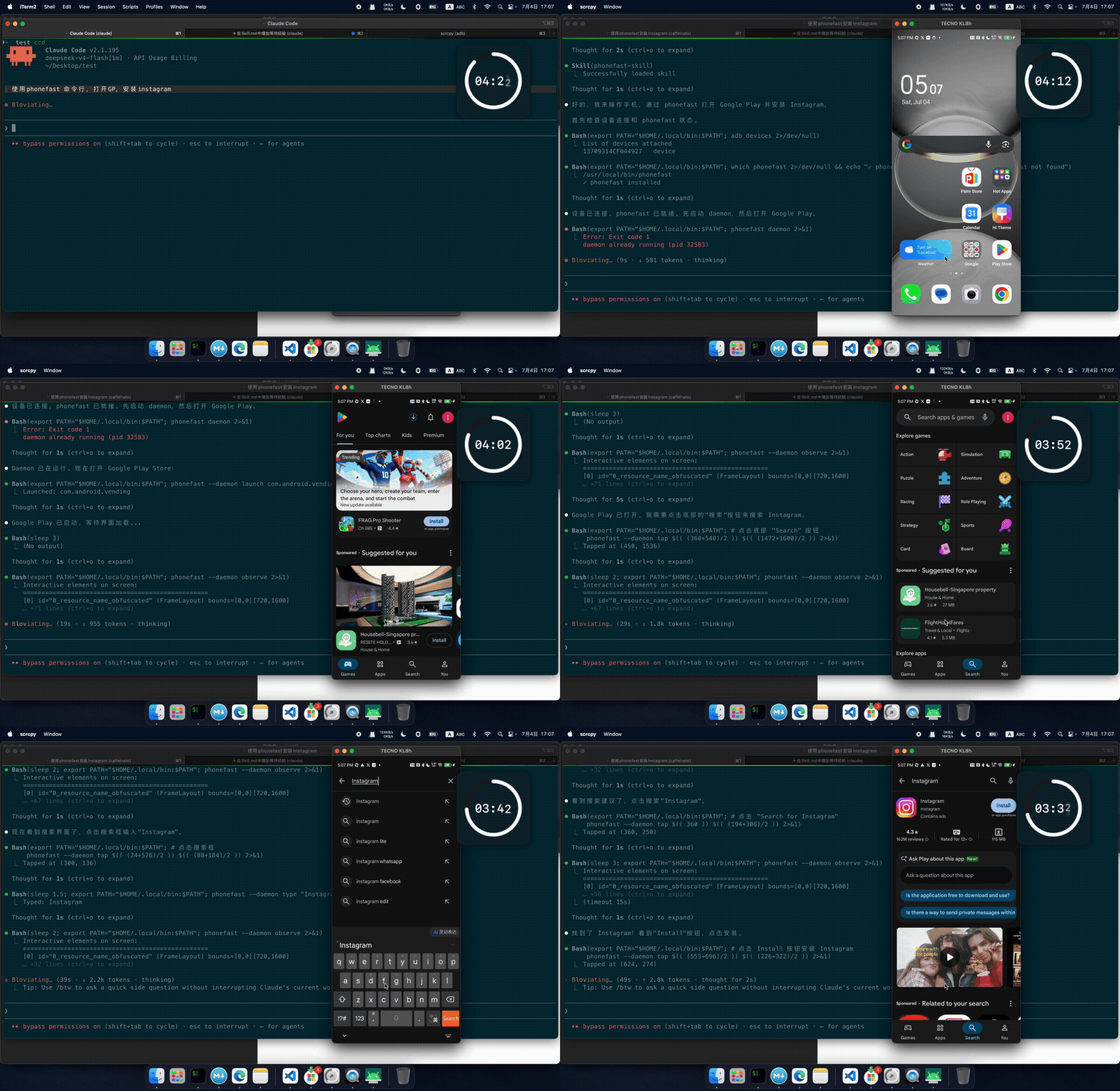
Click to watch the full comparison video: 【PhoneFast vs PhoneMCP】AI Execution Comparison
Installation
1
npx skills add gezihua123/phonefast-skill --skill phonefast-skill
1. Architecture Comparison
phonefast (Go + scrcpy)
flowchart LR
    CLI[phonefast CLI] -->|" Unix Socket JSON-RPC (<1ms)"| DAEMON[Daemon Resident Process]
    DAEMON -->|" TCP (scrcpy protocol)\nPersistent Connection"| SERVER[scrcpy-server\nAndroid Device]

    subgraph DAEMON_INTERNAL[Daemon Internals]
        direction TB
        SESSION[Session Holder]
        CTRL[control socket]
        VIDEO[video socket]
        UI[ui socket]
        SESSION --- CTRL
        SESSION --- VIDEO
        SESSION --- UI
    end

    DAEMON -.-> DAEMON_INTERNAL

    subgraph DEVICE[Android Device]
        direction TB
        VS[video socket]
        CS[control socket]
        US[UI socket]
        SERVER --- VS
        SERVER --- CS
        SERVER --- US
    end
- Language: Go compiled native binary, startup <10ms
- Connection: scrcpy protocol, TCP tunnel directly to scrcpy-server on device
- Daemon: Background resident process, holds persistent device connection, receives commands via Unix Socket
- Cold start: <10ms (Go native binary)
- Command latency: daemon mode <1ms socket communication + ~12ms screenshot decoding (astiav CGO in-process) + Android processing
agent-device (TypeScript + ADB)
flowchart LR
    CLI[agent-device CLI] -->|" Startup ~500ms\nNode.js"| NODE[Node.js Process]
    NODE -->|" subprocess\nnew adb process each time"| ADB[adb shell]
    ADB --> DEVICE[Android Device]

    subgraph SESSION_STATE[Session Management]
        direction TB
        STATE["session state persisted to disk\n~/.agent-device/sessions/"]
        OPEN["open → records app state"]
        CMD["command → reuses session context"]
    end

    CLI -.-> SESSION_STATE
- Language: TypeScript (Node.js CLI), startup ~500ms
- Connection: Raw ADB commands (
adb shell input/keyevent/screencap/uiautomator) - Session: App state persisted to disk after opening, session context reused between commands
- Cold start: ~500ms (Node.js process startup)
- Command latency: ~450-750ms (Node.js process + adb shell)
adb kill (Python + ADB)
flowchart LR
    CLI[adb kill run] -->|" Cold start ~6-8s\nPyInstaller extraction"| PY[Python Interpreter]
    PY -->|" subprocess\nnew process each time"| ADB[adb shell]
    ADB --> DEVICE[Android Device]

    subgraph COLD_START[Cold Start Overhead]
        direction TB
        UNPACK["① PyInstaller extraction ~1s"]
        IMPORT["② Python module import ~2-3s"]
        DETECT["③ ADB device detection ~1s"]
        UNPACK --> IMPORT --> DETECT
    end

    CLI -.-> COLD_START
- Language: Python (packaged as single file via PyInstaller, extracted at runtime)
- Connection: Raw ADB commands (
adb shell input/keyevent/screencap/uiautomator) - State: Stateless, each command goes through full “start → execute → exit” flow
- Cold start: ~6-8s (PyInstaller extraction + Python module import + ADB detection)
- Command latency: ~7-9s (extraction ~1s + import ~2-3s + ADB ~1s + subprocess ~2s + parsing ~0.5s)
2. Speed Comparison
Test Environment: macOS arm64 Go 1.26 Node.js v22.20 agent-device v0.17.6 phonefast v1.0.11
Device: TECNO KL8h (USB) Resolution 488×1080 Test Date: 2026-07-14 Method: Average of 3 runs per operation,
perl -MTime::HiResfull-chain timing; phonefast data from 12-hour stress test (145,843 operations)
| Operation | phonefast daemon | agent-device | adb kill | vs agent | vs adb |
|---|---|---|---|---|---|
| back | 12ms | 520ms | 8,505ms | 43x | 709x |
| home | 13ms | 550ms | 8,864ms | 42x | 682x |
| tap coordinate click | 13ms | 748ms | 8,110ms | 58x | 624x |
| swipe (300ms) | 318ms | N/A¹ | 8,200ms | — | 26x |
| type_text | 1ms | 32,700ms² | 7,890ms | 32,700x | 7,890x |
| screenshot | 28ms | 2,593ms | 8,939ms | 93x | 319x |
| UI elements | 46ms | FAILED² | 7,600ms | — | 165x |
| observe (screenshot+UI) | 28ms | N/A | ~15,500ms³ | — | 554x |
| launch app | 1ms | 782ms⁴ | 8,240ms | 782x | 8,240x |
Typical AI Agent Interaction Loop
xychart-beta
    title "Observe→Act→Re-observe Single Cycle (seconds)"
    x-axis ["phonefast daemon", "agent-device", "adb kill"]
    y-axis "Time (seconds)" 0 --> 30
    bar [0.4, 3.9, 24.0]
xychart-beta
    title "20 Cycles Total Time (seconds)"
    x-axis ["phonefast daemon", "agent-device", "adb kill"]
    y-axis "Time (seconds)" 0 --> 500
    bar [8, 78, 480]
3. Architectural Dimension Comparison
| Dimension | phonefast | agent-device | adb kill |
|---|---|---|---|
| Language | Go (native binary) | TypeScript (Node.js) | Python (PyInstaller) |
| Binary Size | 11MB | ~3MB (npm) | 41MB |
| Running Memory | <62MB RSS | ~30-50MB RSS | ~20-40MB (new process each time) |
| Cold Start | <10ms | ~500ms | ~7s |
| Connection Method | scrcpy protocol (TCP tunnel) | ADB commands | ADB commands |
| Daemon Mode | ✅ Resident process + Unix Socket | ✅ session-state on disk | ❌ Cold start each time |
| Command Latency | 1-13ms | 450-750ms | 7-9s |
| Screenshot Method | scrcpy H.264 keyframe → astiav CGO decode PNG | adb screencap → pull PNG | adb screencap → pull PNG |
| UI Parsing | UISocketHandler (TCP socket) | uiautomator dump | uiautomator dump |
| UI Stability | ⭐⭐⭐⭐⭐ | ⭐⭐ (uiautomator often times out) | ⭐⭐⭐ |
| Persistent Connection | scrcpy server resident on device | No persistent connection | No persistent connection |
| Session Management | Daemon in-memory | State persisted to disk | Stateless |
| Disconnect Recovery | Three-level keepalive, auto-reconnect in 10s | Session state file recovery | Stateless |
| MCP Protocol | ✅ SSE / STDIO (8019) | ✅ agent-device mcp | ✅ SSE / STDIO (8009) |
| Cross-Platform | Android only | iOS / Android / TV / Desktop | Android only |
| ImageContent | ✅ (MCP native) | ❌ | ❌ |
4. Feature Comparison
| Feature | phonefast | agent-device | adb kill |
|---|---|---|---|
| tap coordinate click | ✅ | ✅ | ✅ |
| swipe custom coordinates | ✅ | ❌ (preset directions only) | ✅ |
| type_text | ✅ | ✅ | ✅ |
| screenshot | ✅ (H.264→PNG) | ✅ (screencap) | ✅ (screencap) |
| UI elements (xml) | ✅ UISocketHandler | ❌ | ✅ |
| observe (screenshot+UI) | ✅ (atomic operation) | ❌ | ❌ |
| tap_element | ✅ (MCP mode) | ✅ | ✅ |
| launch_app | ✅ | ✅ | ✅ |
| batch execution | ✅ run JSON | ✅ batch | ✅ run JSON |
| MCP server | ✅ serve (8019) | ✅ mcp | ✅ serve (8009) |
| ImageContent | ✅ (MCP native) | ❌ | ❌ |
| non-ASCII input | ❌ | ❌ | ✅ DEX helper |
| multi-platform | ❌ | ✅ iOS/Android/TV | ❌ |
5. Implementation Principles
5.1 Session Lifecycle
flowchart TD
    C1["Step 1: Deploy scrcpy-server.jar"] --> C2["Step 2: Kill old server instance"]
    C2 --> C3["Step 3: Allocate ports video/UI"]
    C3 --> C4["Step 4: Start scrcpy-server"]
    C4 --> C5["Step 5: ADB forward video socket"]
    C5 --> C6["Step 6: Connect video socket + read dummy byte"]
    C6 --> C7["Step 7: Connect control socket"]
    C7 --> C8["Step 8: Read H.264 video header → resolution"]
    C8 --> C9["Step 9: Wait for UISocketHandler ready 600ms"]
    C9 --> C10["Step 10: ADB forward UI socket + probe"]
    C10 --> C11["Start drainFrames() background goroutine"]
5.2 Screenshot Pipeline (v1.0.11 Architecture)
v1.0.11 refactored the screenshot pipeline from ffmpeg subprocess to astiav CGO in-process decoding, eliminating subprocess creation + pipe I/O overhead, reducing screenshot latency by 3-4x.
The ffmpeg subprocess fallback path is retained (
CGO_ENABLED=0auto-switch).
flowchart TD
    DEVICE["Android device video stream H.264"] -->|TCP| SOCKET["scrcpy video socket"]
    SOCKET -->|drainFrames background goroutine| NAL["NAL unit parsing: SPS/PPS/IDR"]
    NAL --> CACHE["LRU cache latest keyframe"]
    NAL --> REQ["requestKeyframe() when missing\nsend RESET_VIDEO control frame"]

    CACHE -->|"keyframeToPNG()"| CHOICE{"CGO_ENABLED?"}

    CHOICE -->|"Default: yes"| ASTIAV["astiav.Decoder\n(in-process CGO)"]
    ASTIAV --> CTX["CodecContext\nThreadCount=1\npersistent reuse"]
    CTX --> DEC["SendPacket + ReceiveFrame"]
    DEC --> SWSCALE["sws_scale\nH.264→RGBA"]
    SWSCALE --> ENC["astiav encode to PNG bytes"]
    ENC --> MC["MCP ImageContent\n{type:image, data, mimeType}"]

    CHOICE -->|"Fallback: no"| FFMPEG_CLI["ffmpeg CLI subprocess\nexec.CommandContext"]
    FFMPEG_CLI --> STDIN["stdin: -f h264 -i pipe:0"]
    STDIN --> STDOUT["stdout: -vcodec png pipe:1"]
    STDOUT --> MC
Two Path Comparison:
| Dimension | Main Path (astiav CGO) | Fallback Path (ffmpeg CLI) |
|---|---|---|
| Trigger | CGO_ENABLED=1 (default build) | CGO_ENABLED=0 (cross-compile, etc.) |
| Decode Method | In-process C function call | fork + exec subprocess |
| Data Transfer | Zero-copy memory pointer passing | pipe stdin → stdout (memcpy ×2) |
| Codec Context | Persistent reuse (DPB retained) | New process each time (SPS/PPS re-parsed) |
| Threads | ThreadCount=1 | Default multi-thread |
| Screenshot P50 | 28ms 🚀 | ~100-200ms |
| Cold Start Screenshot | ~19ms | ~167ms |
| External Dependencies | None (FFmpeg statically linked) | System requires ffmpeg installed |
Why single thread is faster:
- 488×1080 single-frame decoding is tiny; multi-thread slicing sync overhead > decode itself
- Multi-thread causes DPB (Decoded Picture Buffer) double allocation, memory bloat
- ThreadCount=1 eliminates slice-merge and inter-thread sync, more stable latency
Why persistent context is faster than new:
- Each
SendPacket(nil)flush reinitialization → +55ms (SPS/PPS re-parse + DPB rebuild) - Persistent context reuses previous frame’s reference buffer, new IDR naturally overwrites old
- No flush = zero extra overhead
Why keyframes:
- I-frames (IDR/Keyframe) contain the complete picture, can be decoded independently
- P/B-frames only contain delta data, depend on reference frames
- Screenshots must use I-frames; when missing,
RESET_VIDEOtriggers device to generate one immediately
5.3 UI Element Retrieval
flowchart TD
    GET["GetUIElements()"] --> FAST{"UISocketHandler available?"}
    FAST -->|"Fast path"| SOCKET["TCP connect UI socket"]
    SOCKET --> SEND["Send dump request"]
    SEND --> XML["Receive XML"]
    XML --> PARSE["Parse UIElement list"]
    FAST -->|"Fallback ADB"| ADB["adb shell uiautomator dump"]
    ADB --> PULL["pull XML file"]
    PULL --> PARSE
phonefast’s UISocketHandler is a custom extension of scrcpy-server, providing UI dump service via abstract socket, approximately 40% faster than uiautomator dump.
5.4 Keepalive & Disconnect Recovery
flowchart TD
    subgraph L1["1. TCP Keepalive"]
        CK["control socket: 15s"]
        VK["video socket: 30s"]
    end

    subgraph L2["2. healthLoop 10s cycle"]
        ALIVE["IsAlive() check"]
        VD["videoDied channel closed?"]
        CE["controlErr is nil?"]
        ALIVE --> VD
        ALIVE --> CE
    end

    subgraph L3["3. Write Failure Detection"]
        WF["Write() fails"]
        MCB["markControlBroken()"]
        WF --> MCB
    end

    L1 --> L2
    L2 -->|"Disconnect detected"| RECONNECT["reconnect() auto-reconnect"]
    L3 -->|"Write failure"| RECONNECT
5.5 Daemon Mode
sequenceDiagram
    participant CLI as phonefast CLI
    participant DS as Unix Socket
    participant DM as Daemon
    participant SESS as Session
    participant DEV as Android Device

    Note over DM: Startup: connect device + create socket + healthLoop

    CLI ->> DM: ensureDaemon() check/start
    CLI ->> DS: JSON-RPC tap(x=540, y=960)
    DS ->> DM: dispatch "tap"
    DM ->> SESS: Tap(540, 960)
    SESS ->> DEV: Touch Down
    SESS ->> DEV: Touch Up
    DEV -->> SESS: ok
    SESS -->> DM: ok
    DM -->> CLI: {"result":"Tapped at (540, 960)"}
5.6 MCP ImageContent Return
1
2
3
4
5
6
{
  "content": [
    {"type": "text",      "text": "Screenshot (1080x2400)"},
    {"type": "image",     "data": "iVBORw0KGgoAAA...", "mimeType": "image/png"}
  ]
}
6. Long-duration Stress Test (v1.0.11 Optimized)
12-hour continuous stress test, 145,843 operations, 100% success rate, zero disconnections.
| Metric | Value |
|---|---|
| Duration | 720 minutes (12 hours) |
| Total Operations | 145,843 |
| Successful | 145,843 |
| Failed | 0 |
| Success Rate | 100% |
| Daemon Disconnects | 0 |
| Performance Degradation | ❌ None |
| RSS Peak | <62MB |
12 Operation Latency Overview:
| Operation | Count | P50 | P95 | P99 | Avg | Max |
|---|---|---|---|---|---|---|
tap | 49,943 | 13ms | 13ms | 14ms | 12ms | 453ms |
back | 16,639 | 13ms | 13ms | 14ms | 12ms | 474ms |
home | 16,642 | 13ms | 13ms | 14ms | 12ms | 18ms |
press_key | 16,650 | 13ms | 13ms | 14ms | 12ms | 18ms |
swipe | 8,384 | 318ms | 322ms | 323ms | 318ms | 821ms |
screenshot | 4,185 | 28ms | 126ms | 128ms | 49ms | 132ms |
observe | 4,188 | 28ms | 126ms | 129ms | 51ms | 134ms |
get_ui_elements | 4,189 | 46ms | 132ms | 151ms | 61ms | 192ms |
type_text | 4,188 | 1ms | 1ms | 2ms | 1ms | 6ms |
launch_app | 4,187 | 1ms | 1ms | 2ms | 1ms | 5ms |
status | 4,189 | 1ms | 1ms | 2ms | 1ms | 3ms |
wait | 12,459 | 33ms | 33ms | 33ms | 32ms | 38ms |
7. Use Cases
phonefast daemon → AI Agent First Choice
- High-frequency AI Agent interaction (observe→act→re-observe loop)
- Requires ultra-low latency (<30ms)
- Batch automation scripts
- Requires MCP ImageContent native image return
1
2
3
4
phonefast daemon                              # Start (one-time only)
phonefast --daemon tap 540 960                # Tap (13ms)
phonefast --daemon screenshot /tmp/s.png      # Screenshot (28ms)
phonefast --daemon observe                    # Screenshot+UI (28ms)
Recommended Stack
1
2
3
4
5
Primary:   phonefast daemon  (Speed King, Android AI Agent First Choice)
           + phonefast serve  (MCP mode, includes tap_element)

Supplemental: agent-device  (when iOS automation / recording replay / performance sampling needed)
              adb kill      (when OCR / non-ASCII input / package search needed)
Why phonefast is More Stable
1
2
3
4
5
6
7
phonefast:  scrcpy-server resident on device, TCP connection sustained for 12+ hours
            daemon in-memory session, zero state reconstruction overhead between commands
            three-level keepalive (TCP keepalive + healthLoop + write failure detection)

agent-device/adb kill: new adb shell subprocess for each command, destroyed after use
                       no persistent connection, read session or cold start each time
                       command failure = error, no auto-recovery